Back to »
Get control of your IT before it controls you
In this episode I talk to Joe McAuley from TechFirst IT Solutions about how to ensure you have the IT infrastructure you need in your business.
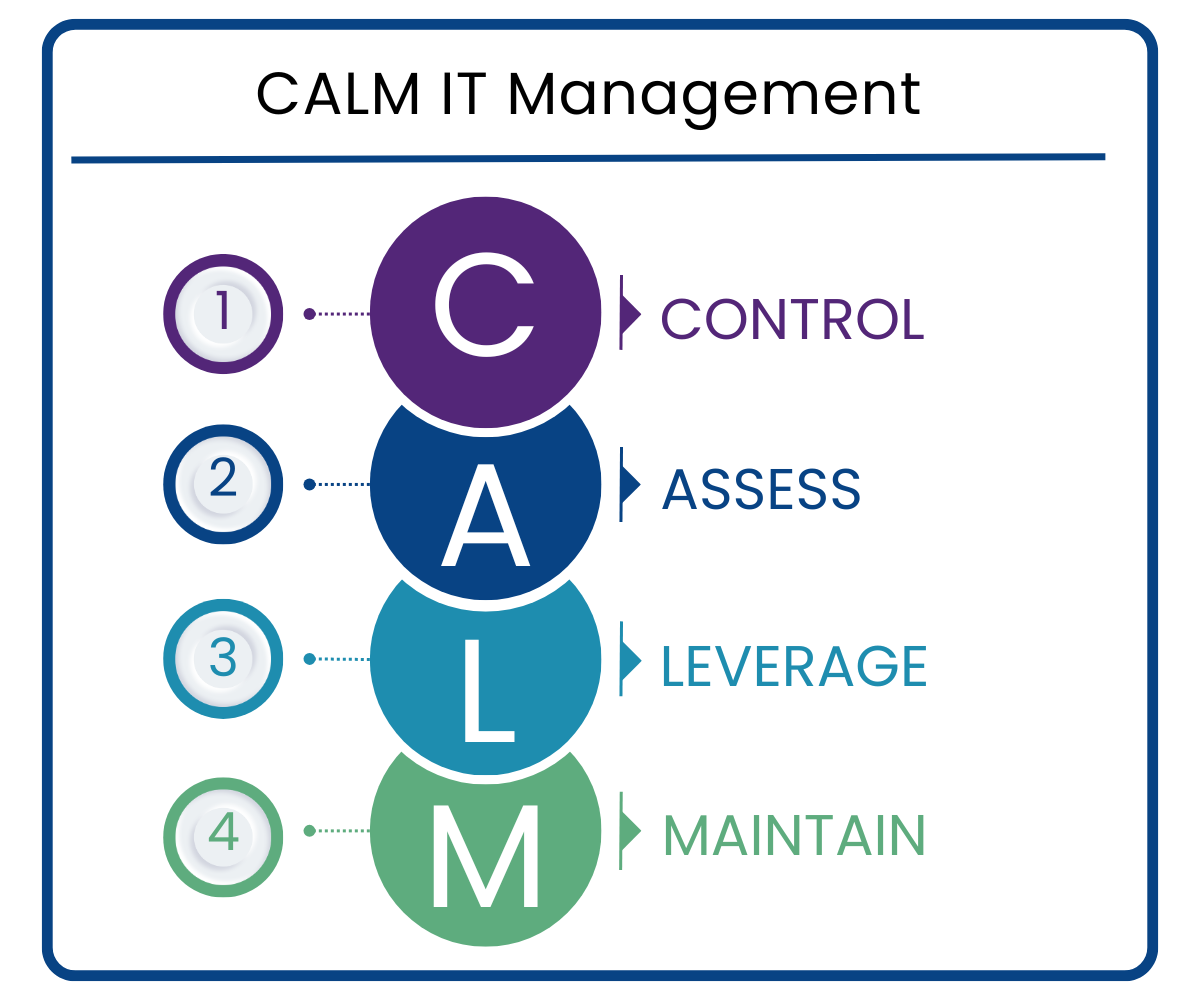
Joe shares his expertise on taking control of your IT infrastructure before it controls you. The conversation covers understanding your current IT setup and critical systems, assessing gaps and security measures, leveraging cloud services for scalability, and maintaining systems through managed IT support.
Watch the episode
Video editing by Squinty Pixels. Slightly dodgy lighting & sound, TheIBG.
Get personalised insight and advice from Joe by taking our quick quiz.

Show notes
Section 1: Control – getting on top of what you have
For a business owner who is not technical and is firefighting IT issues rather than managing them proactively, where do they start?
Joe: The first step is understanding what you actually have. That means your PCs, any servers, cloud services like Microsoft 365 or Azure, software subscriptions, broadband, telephony, everything. Just getting a clear picture of what you are paying for and what is in your IT setup.
Joe: From there you can work out which of those are your critical systems. What are the things that, if they went down or stopped working properly, would have a real impact on your business? Once you know that, you can focus your investment and attention on protecting those elements and making sure you maximise your uptime.
Joe: Another important step is having some ownership within the business. This does not need to be a technical person. It just needs to be someone who knows what you have, what services you are paying for, and who to contact when something goes wrong. Who looks after the printer? Who do you call if the software goes down? Having a single point of contact that everyone in the business can go to makes a real difference. They do not need to fix things themselves, they just need to know who does.
Shona: From a procurement perspective, finding someone willing to take ownership of these things can be a real challenge in itself.
Joe: Absolutely, and it is an important part of getting control. Once you have that person in place, everything else becomes much easier to manage.
Section 2: Assess – identifying where your IT risks are
Once a business has done that initial audit and identified its critical systems, what should it be assessing in terms of risk and gaps?
Joe: Building on knowing what your critical systems are, the next question is: what is your fallback position if those systems go down? If your CRM becomes unavailable, do you have another way to access customer contact details? Do you have a manual process you can revert to? It is worth thinking through those scenarios before they happen rather than after.
Joe: Security is a big area to assess as well. What are you doing about backups, antivirus, EDR, SOC services? If the honest answer is you are not sure, or you think you might be covered but cannot say for certain, that is a gap that needs to be looked at. Backups are your last line of defence, but a lot of businesses run backups and never test them. You should be doing regular restores to check they actually work.
Joe: You should also think about where your business is heading. What are your plans over the next one, three, or five years? Your IT systems need to be able to scale alongside that growth, not hold you back.
Shona: Is that a common issue, where older systems become the thing that limits a business from growing?
Joe: It is, particularly where businesses are still running older on-premise servers. There will often be a physical server tucked away in a cupboard somewhere, rattling away, and nobody looks at it until something goes wrong. With modern cloud systems, scalability is largely built in. As your business grows, the cloud services grow with it. The cost model changes to a monthly subscription basis, which does mean costs rise as you add people, so you need to factor that into your planning. But it gives you a lot more flexibility than trying to spec a physical server correctly, which traditionally meant either overpaying for capacity you did not need or underpaying and having to replace it earlier than expected.
Section 3: Leverage – getting the most from external IT expertise
What are the real benefits for a business of bringing in an external IT provider rather than trying to manage everything in-house?
Joe: The biggest benefit is that you hand over the burden of managing all of it. Everything we talked about in terms of understanding what you have, keeping systems updated, managing subscriptions, monitoring for issues, you let someone else take care of that. You also get access to a broader skillset than any one person could realistically have. An IT support company brings a whole team behind it, plus relationships with channel partners and industry specialists you can tap into.
Joe: There can also be a cost advantage. Outsourcing to an IT provider can work out cheaper than employing someone in-house, and you do not have to deal with cover for holidays or sick days. You get ongoing support without those gaps.
Shona: That cover issue must be a real problem for smaller businesses who rely on one internal person.
Joe: It is. For businesses that have grown to the point where they do need someone internal, a good approach is to use an external IT partner to handle the day-to-day monitoring and reactive support, and let the internal person focus on projects and the bigger strategic stuff. That stops your internal person getting bogged down in work that eats up their time without adding much value.
Joe: The other thing worth saying is that businesses start and grow because the founders are good at something specific. You cannot be good at everything. Most businesses use an accountant because that is not their area. IT is the same. It is not your skillset, but it matters enormously to how your business runs. Handing it to someone who does it every day takes that pressure off you and means it gets done properly.
Section 4: Maintain – keeping your IT running well over time
Once a business has its IT in order, how does it stay on top of it proactively rather than slipping back into firefighting?
Joe: Proactive maintenance is a big part of what we do. That means making sure systems are getting regular updates, applying Microsoft’s monthly patches across all machines, and keeping any other systems up to date as and when they need it. It is about staying on top of it consistently rather than reacting when something breaks.
Joe: You should also be getting monthly reporting from your IT provider. Something that shows what has been dealt with, what proactive work has been done, and how your systems are performing. A lot of the work an IT partner does happens in the background and you will not necessarily see it. A monthly report gives you visibility and confirms that what you are paying for is actually being done.
Joe: Beyond that, quarterly business reviews with your IT partner are really valuable. Not just to check on the systems, but to make sure your IT is aligned with where your business is heading. If you are planning to grow, or you are changing how you work, your IT needs to be ready for that. An IT partner who understands your business can make sure your systems are set up to enable your plans rather than limit them.
Shona: That ongoing relationship must make a real difference. It is not just about fixing things when they break, it is about having someone who understands your business well enough to give you genuinely useful advice.
Joe: Exactly. That is what separates a good IT partnership from just having someone you call when things go wrong. The more your IT partner understands your business, the better placed they are to make sure your systems support where you are going.
Getting in touch
Shona: Thanks very much Joe. We’ve covered how to get control of your IT before it controls you, working through control, assessing your risks, leveraging external expertise, and maintaining your systems proactively. If you want to get in touch with Joe, the website and LinkedIn links are below. And as always, this episode comes with a quiz so you can do a self-assessment and get bespoke advice based on where your business is right now.
Joe: Thanks very much Shona. Thanks for having me.
Links

Do you have a question for our experts?
Submit your question here and if it fits with our current and planned content, we’ll find a supplier to answer your question via either our podcast or our blog.

Interested in being featured in our podcast or blogs?
We ask some of our expert suppliers, who we have carefully vetted, to provide expert advice via our podcast and our blog. If you would like to find out more about this we are inviting potential contributors to register your interest.